
Free iPad Simulator & Emulator for Website Testing
Preview any website on iPad Pro, iPad Air, iPad Mini and more — directly in your browser. No device needed.
- Free
- 30,000+ users
Why Test Your Website on iPad?
Your site may look perfect on mobile — and completely broken on iPad.

iPad Users Expect a Desktop-Quality Experience
iPad users browse with a larger screen and often expect layouts closer to desktop. A site optimized only for phone-sized viewports will look stretched and unpolished on iPad.

iPad Has Unique Viewport Sizes
iPad models range from 768px to 1366px viewport width — a range that falls between typical mobile and desktop breakpoints. These in-between sizes are where layouts break most often.

Browser on iPad Renders Differently
iPads run browsers with tablet-specific behaviors — split view, pointer events, and viewport scaling work differently than on iPhone or desktop Chrome.

No Real Device Required
A new iPad Pro costs $1,000+. Phone Simulator gives you accurate iPad simulation for free — no hardware, no setup, no waiting.
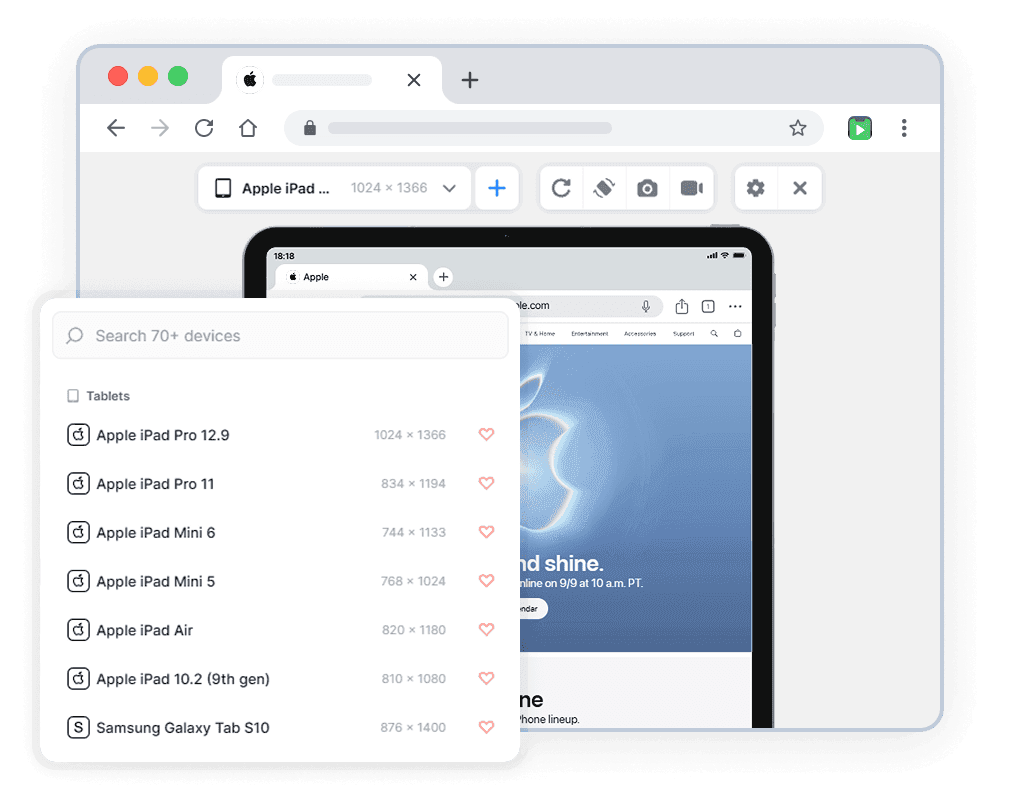
iPad Models You Can Simulate
All models available in the mobile simulator extension. Accurate viewport dimensions and realistic browser interface.
Start Simulating in 60 Seconds
No account, no setup, no physical device.
Install the Extension
Add Phone Simulator to Chrome from the Web Store. Free, one click, no signup required.
Open Any Website
Go to your site, localhost, staging URL, or any live domain you want to test.
Pick a Device Model
Select the model from the list — your website instantly appears inside a realistic frame.
Real User Reviews
Rated 4.7 in Chrome Web Store

Zwe Thuta

Great simulation app. I used it everyday at work.

Donnovan Wint
This extension is a God send. It's now an integral part of my development toolbox. LOVE IT!!

Jean Bertin cwakou
This is a great one, a very good phone simulator, works well and fast as well. Congrat!
Frequently Asked Questions
Is iPad mobile simulator Chrome extension free?
Yes. iPad mobile simulator is a free Chrome extension — no subscription, no account required. Install it from the Chrome Web Store in one click and start testing immediately.
How is iPad simulator and emulator different from Chrome DevTools?
Chrome DevTools shows a bare viewport with no visual context. iPad simulator replicates the real mobile browser interface — status bar, network icons, browser chrome — so you see exactly what your users see. It also supports instant device switching and one-click screenshots.
Can I test localhost with iPad mobile simulator extension?
Yes. iPad mobile simulator works with any URL — localhost:3000, 127.0.0.1, staging environments, and live production sites. No extra configuration needed.
Does iPad simulator work with React, Next.js and other frameworks?
Yes. iPad simulator works with any website regardless of how it was built — React, Next.js, Vue, Angular, Nuxt, SvelteKit, Webflow, WordPress, or plain HTML.
Do I need a real iPad to use a mobile emulator?
No. iPad mobile emulator gives you accurate simulation for free — no hardware, no setup, no waiting. A new iPad costs $1,000+. Phone Simulator is free to get started — no credit card required.
Can I use iPad simulator online without installing anything?
Phone Simulator is a lightweight Chrome extension — it takes one click to install and works instantly on any website. No separate online tool or account needed.
Does iPad simulator support the latest iPad Pro and iPad Air models?
Yes. Phone Simulator includes the latest iPad Pro, iPad Air, iPad Mini and more — updated regularly as new iPad models are released.
Is there a free iPad simulator for website testing available online?
Yes. Phone Simulator works directly in Chrome — no separate online tool needed. Install the extension once and simulate any iPad model instantly on any website. Free to get started — no credit card required.
Install Phone Simulator Today
Join thousands of developers and designers who test their sites on real devices for free.
- Free
- 30,000+ users
iPad Testing Guides
Practical guides to help you build better websites for iPad users.
Why Android and iOS Render Websites Differently - And How to Design for Both
Android and iOS render websites differently due to fundamental differences in their browser engines, default settings, and system-level behaviors. Understanding these differences is crucial for creating websites that work seamlessly across all devices.
Read more
Mobile Navigation Patterns: What Works in 2026
This guide breaks down the navigation patterns that work in 2026, when to use each one, and how to implement them effectively across different devices.
Read more

Most Popular Mobile Screen Resolutions in 2026: What Developers Should Know
In this guide, we break down the most common viewport widths in 2026, explain why raw manufacturer resolutions don’t matter, and show how to test your website using realistic device simulations - including references to the iPhone 17 Pro, iPhone 16, Pixel 9, and more.
Read more