

Why Your Website Should Load in Under 2 Seconds on Mobile - Backed by 2025–2026 Data

This guide explains why 2 seconds became the standard, what current data tells us about mobile performance, and how to hit that target consistently across devices and networks.
📋 Table of Contents
- The Data: What 2 Seconds Actually Means for Your Business
- Why Mobile Makes Speed Even More Critical
- What Makes the 2-Second Threshold Special
- The Biggest Mobile Speed Killers in 2026
- How to Measure Your Mobile Load Speed Correctly
- 10 Practical Steps to Hit 2 Seconds on Mobile
- Real-World Performance Improvements
- The iOS vs Android Performance Divide
- When "Fast Enough" Actually Isn't
- The Performance Budget Approach
- Tools to Monitor Mobile Performance
- The Bottom Line: Speed Is Revenue
Every second your website takes to load costs you customers. That's not hyperbole - it's measurable, documented, and backed by years of performance research. In 2026, with mobile devices accounting for over 60% of global web traffic, load speed has become the single most important technical factor affecting both user experience and revenue.
The threshold that matters? Two seconds. Not three. Not five. Two seconds from the moment someone taps your link to when they can meaningfully interact with your content. Exceed that window and you're actively losing visitors, conversions, and search visibility.
The Data: What 2 Seconds Actually Means for Your Business
Mobile load speed directly impacts your bottom line. Here's what recent research shows:
Conversion rate impact:
- Pages loading in 1 second convert at baseline rates
- At 2 seconds, conversion rates drop by approximately 7-10%
- At 3 seconds, conversion drops by 15-20%
- At 5 seconds, you've lost 38% of potential conversions
- Beyond 6 seconds, bounce rates exceed 50%
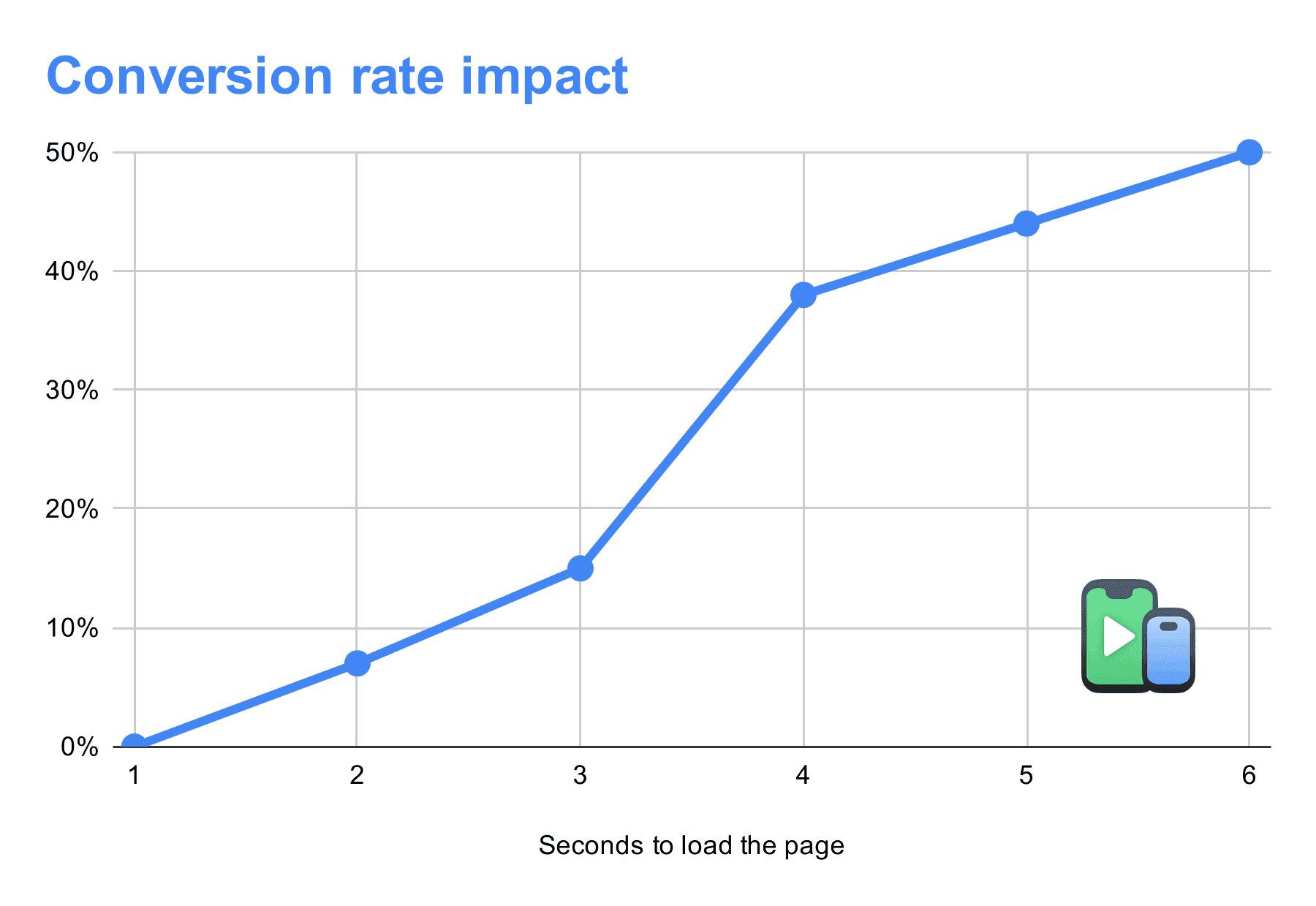
Google's 2025 mobile behavior study found that 53% of mobile users abandon sites that take longer than 3 seconds to load. By the time your page hits 4-5 seconds, you're looking at 70%+ abandonment rates.
SEO consequences: Page speed became a direct ranking factor in Google's Core Web Vitals update. Sites loading under 2.5 seconds on mobile see measurably better rankings than slower competitors, even with identical content quality.
Real revenue impact: Amazon's internal data has consistently shown that every 100ms of latency costs them approximately 1% in revenue. At scale, that's millions of dollars lost to load time.
The pattern is clear: speed isn't just user experience - it's a competitive advantage that directly affects discoverability, engagement, and revenue.
Why Mobile Makes Speed Even More Critical
Desktop users have generous bandwidth and powerful processors. Mobile users don't. They're on variable cellular connections, running multiple apps simultaneously, with limited RAM and CPU resources.
Mobile-specific performance challenges:
Network variability: Users switch between 5G, LTE, 4G, and WiFi constantly. Your site might load instantly on office WiFi but crawl on cellular during commute.
Processing constraints: Even flagship phones in 2026 have less processing power than budget laptops. Budget Android devices running your site might be 3-4 years old with severely limited specs.
Battery consciousness: Heavy JavaScript and continuous repainting drain battery. Users associate slow, janky sites with battery drain and avoid them.
Attention scarcity: Mobile users are distracted - walking, commuting, multitasking. If your page hasn't loaded by the time they look away, they're not coming back.
This combination creates a harsh reality: the same codebase that loads acceptably on desktop can feel unusably slow on mobile.
What Makes the 2-Second Threshold Special
Two seconds isn't arbitrary. It's based on cognitive research about attention spans and task completion.
Human perception thresholds:
- 0-100ms: Feels instant
- 100ms-300ms: Slight perceptible delay
- 300ms-1000ms: Noticeable but acceptable
- 1-2 seconds: User stays focused but starts noticing delay
- 2-5 seconds: Attention wanders, frustration builds
- 5+ seconds: Perceived as broken, high abandonment
At 2 seconds, you're right at the edge of acceptable. Users haven't mentally given up yet, but their patience is wearing thin. Push beyond 2.5 seconds and you're in the danger zone where competitors win by default.
Google's research on mobile behavior patterns shows that the 2-second mark represents the point where user confidence in a site begins degrading rapidly. Before 2 seconds, users trust the experience. After 2 seconds, doubt creeps in.
The Biggest Mobile Speed Killers in 2026
Modern websites are bloated. The average mobile page now weighs over 2MB - triple what it was in 2016. Here's what's actually slowing you down:
1. Unoptimized Images
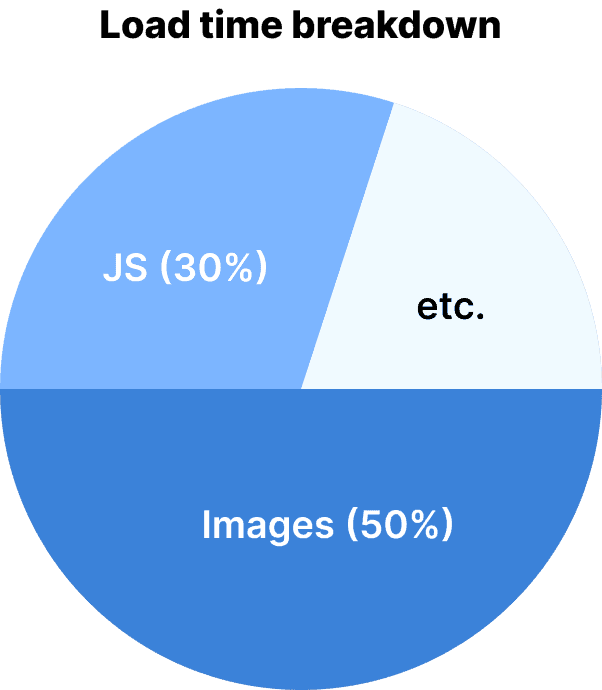
Images typically account for 50-70% of page weight. A single uncompressed hero image can be 3-5MB alone.
Common image mistakes:
- Serving desktop-sized images to mobile devices
- Using PNG when JPEG or WebP would work
- Not implementing responsive images with srcset
- Loading all images immediately instead of lazy loading
2. JavaScript Bloat
Modern frameworks and third-party scripts have made JavaScript bundles massive. React apps routinely ship 500KB+ of JavaScript before users can interact with anything.
JS performance problems:
- Render-blocking scripts that prevent page display
- Excessive third-party analytics and tracking
- Unused library code shipped to all users
- Heavy frameworks for simple static content
3. Render-Blocking Resources
CSS and JavaScript files that block initial page rendering are silent killers. Every external stylesheet or script tag in your <head> delays the entire page.
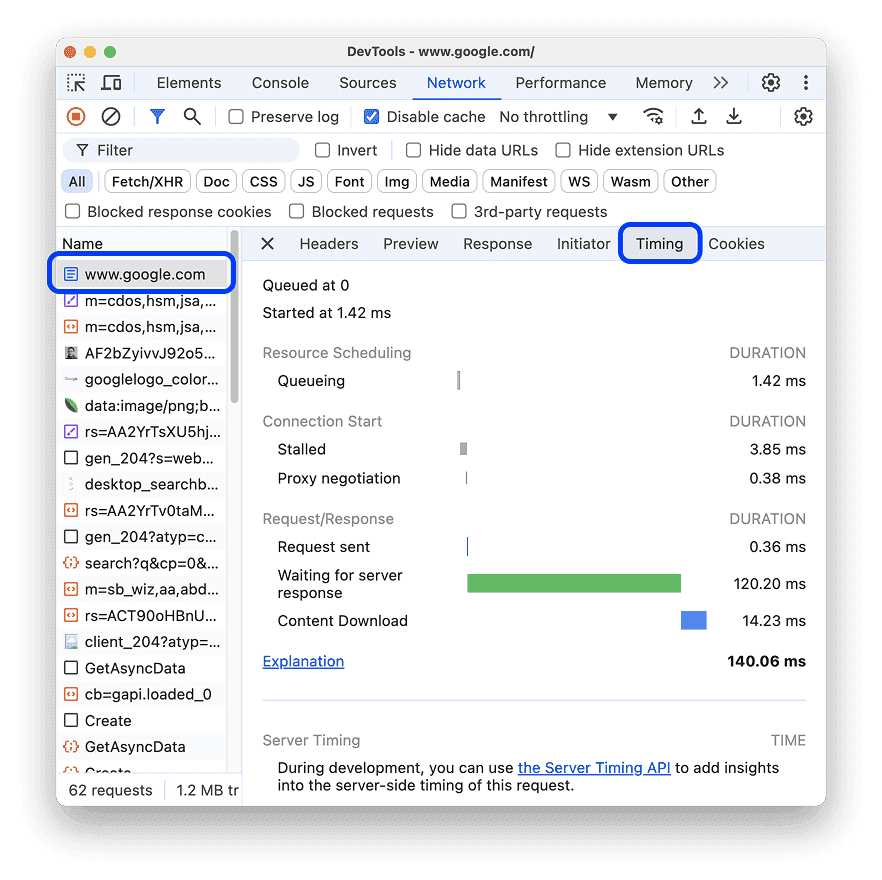
4. Server Response Time (TTFB)
If your server takes 800ms to generate HTML, you've already consumed 40% of your speed budget before sending a single byte to the user.
TTFB bottlenecks:
- Slow database queries
- Unoptimized server-side rendering
- Distant server locations (no CDN)
- Server overload or poor hosting
5. Third-Party Scripts
Every analytics tool, chat widget, ad network, and social plugin adds weight. A single third-party script can easily add 200-500ms to load time.
The average website loads scripts from 20+ external domains. Each introduces network overhead, parsing time, and potential single points of failure.
How to Measure Your Mobile Load Speed Correctly
Before optimizing, you need accurate measurements. Many developers test incorrectly and get misleading results.
Use Real-Device Testing, Not Just Lab Data
Google PageSpeed Insights and Lighthouse provide lab scores, but they don't capture real user experience. Your site might score 95 in Lighthouse but feel slow on actual devices.
Why lab scores mislead:
- Tests run on high-end hardware with fast connections
- No real JavaScript execution under load
- Doesn't account for browser extensions, OS overhead, or multitasking
- Missing third-party script performance impact
Instead, prioritize:
- Core Web Vitals from real users (Google Search Console)
- Real User Monitoring (RUM) tools that track actual visitor performance
- Testing on budget Android devices that represent average users
Test on Throttled Networks
Your office WiFi isn't representative. Test on simulated 3G and 4G connections to see how real users experience your site.
Chrome DevTools allows network throttling to simulate:
- Slow 3G (400ms RTT, 400Kbps down)
- Fast 3G (300ms RTT, 1.6Mbps down)
- Regular 4G (150ms RTT, 4Mbps down)
Most users are on 4G or LTE, not 5G. Design for the common case, not the best case.
Key Metrics to Track
Largest Contentful Paint (LCP): When the largest visible element loads. Target: under 2.5 seconds.
First Input Delay (FID): Time until page becomes interactive. Target: under 100ms.
Cumulative Layout Shift (CLS): Visual stability during load. Target: under 0.1.
Time to Interactive (TTI): When page is fully usable. Target: under 3.5 seconds.
LCP is the most important metric for perceived load speed. If your hero image or headline appears quickly, users feel like the site is fast - even if full interactivity takes another second.
10 Practical Steps to Hit 2 Seconds on Mobile
1. Optimize and Compress All Images
Convert images to modern formats (WebP, AVIF) that offer 30-50% better compression than JPEG.
Image optimization checklist:
- Use responsive images with srcset for different screen sizes
- Lazy load images below the fold
- Compress images to appropriate quality (80-85% is usually invisible to users)
- Use proper dimensions - don't resize 2000px images with CSS
Tools: Squoosh, TinyPNG, or automated services like Cloudinary.
2. Minimize JavaScript Execution
Audit your JavaScript bundles and eliminate unused code.
JS reduction strategies:
- Code splitting: only load what's needed for the current page
- Tree shaking: remove unused library code
- Defer non-critical JavaScript
- Replace heavy frameworks with lighter alternatives when possible
A React app that ships 400KB of JS can often be rebuilt with vanilla JavaScript or Svelte at 40KB with identical functionality.
3. Implement Critical CSS
Inline the minimal CSS needed to render above-the-fold content. Load the rest asynchronously.
<style>
    /* Critical CSS inlined here */
</style>
<link rel="preload" href="main.css" as="style" onload="this.onload=null;this.rel='stylesheet'">
This makes the initial render instant while deferring non-critical styles.
4. Use a Content Delivery Network (CDN)
CDNs distribute your content globally, reducing latency by serving files from locations near your users.
Popular CDN options:
- Cloudflare (free tier available)
- AWS CloudFront
- Fastly
- BunnyCDN (budget-friendly)
A CDN typically reduces load time by 40-60% for international visitors.
5. Enable Text Compression
Gzip or Brotli compression reduces text file sizes by 70-80%. Most servers support this but many sites don't enable it.
Verify compression in Chrome DevTools Network tab - look for the "Content-Encoding: br" or "gzip" header.
6. Optimize Web Fonts
Fonts can add 200-500KB and cause significant render delays.
Font optimization:
- Use font-display: swap to prevent invisible text
- Subset fonts to include only needed characters
- Prefer system fonts when possible
- Limit to 2-3 font variations maximum
7. Reduce Server Response Time
Optimize your backend to respond in under 200ms.
Backend improvements:
- Cache database queries
- Use efficient database indexes
- Implement full-page caching for static content
- Upgrade hosting if server resources are maxed out
8. Eliminate Render-Blocking Resources
Move JavaScript to the bottom of the page or use async/defer attributes. Load CSS asynchronously when possible.
9. Minimize Third-Party Scripts
Audit every third-party script. Each one should justify its performance cost.
Questions to ask:
- Do we actually use this analytics platform?
- Can we self-host this script instead of loading from external domain?
- Does this chat widget need to load immediately or can it defer?
- Can we load social sharing buttons on-demand?
Removing just 3-4 unnecessary scripts can shave 500ms-1s off load time.
10. Test on Real Devices Continuously
Performance degrades over time as you add features. Regular testing catches regressions before they impact users.
Preview your site's performance across different device profiles as you develop. This helps you spot performance issues specific to lower-end devices or different screen sizes before deployment. Tools that let you quickly visualize your site on multiple devices make it easier to catch slowdowns early.
For a comprehensive guide to mobile testing approaches, check out our article on testing websites across 30+ devices without needing physical hardware
Real-World Performance Improvements
Case Study: E-commerce Site Optimization
A mid-sized online retailer reduced mobile load time from 4.2 seconds to 1.8 seconds through:
- Image optimization (saved 1.2s)
- Removing unused JavaScript (saved 0.7s)
- Implementing CDN (saved 0.5s)
Result: 23% increase in mobile conversion rate, 35% decrease in bounce rate.
Case Study: Content Publisher
A news site reduced load time from 5.1 seconds to 2.3 seconds by:
- Lazy loading images (saved 1.4s)
- Deferring ads and third-party scripts (saved 1.0s)
- Optimizing fonts (saved 0.4s)
Result: 18% increase in page views per session, 27% improvement in ad viewability.
These aren't exceptional cases - they're typical results when teams prioritize performance.
The iOS vs Android Performance Divide
Speed optimization becomes even more important when you consider how differently iOS and Android devices handle performance. Safari on iOS and Chrome on Android have distinct rendering engines that affect how quickly your site becomes interactive.
Budget Android devices, which represent a significant portion of mobile traffic in many markets, often struggle with performance in ways that flagship iPhones mask. Understanding these platform differences helps you optimize for real-world device diversity.
For deeper insight into these platform-specific behaviors, our guide on iOS vs Android rendering differences explains how to design for both ecosystems effectively.
When "Fast Enough" Actually Isn't
Some teams look at their metrics, see 3-second load times, and think "that's acceptable." It's not. Here's why:
Competitive pressure: Your competitors are optimizing. If they load in 1.8 seconds and you load in 3.2 seconds, users will notice and prefer the faster experience.
Compound effects: A 3-second load combines with slow interactivity, heavy animations, or clunky UI to create an overall "slow" perception - even if no single element is terrible.
Future-proofing: Sites get heavier over time. Starting at 3 seconds means you'll be at 4-5 seconds in six months as features accumulate.
Mobile user expectations: Desktop users tolerate slightly more delay. Mobile users expect instant. The bar is simply higher.
The Performance Budget Approach
Set explicit performance budgets and enforce them:
Example budget:
- Total page weight: 1MB maximum
- JavaScript: 200KB maximum
- Images: 500KB maximum
- Fonts: 100KB maximum
- LCP: under 2.0 seconds
Track these metrics in CI/CD and fail builds that exceed budgets. This prevents performance degradation over time.
Tools to Monitor Mobile Performance
Free tools:
- Google PageSpeed Insights
- Chrome DevTools Performance tab
- WebPageTest (test on real devices globally)
- Lighthouse CI (automated performance testing)
Paid monitoring:
- SpeedCurve ($20/month) - continuous monitoring
- Calibre ($49/month) - performance monitoring with alerts
- New Relic ($99/month) - full APM with real user monitoring
Even basic free tools provide enough data to identify and fix most performance issues.
The Bottom Line: Speed Is Revenue
Mobile load speed isn't a technical nicety - it's a business requirement. Every 100ms of improvement translates to measurable gains in conversion rate, SEO ranking, and user satisfaction.
The 2-second threshold isn't aspirational. It's the minimum viable speed for competitive mobile experiences in 2026. Sites that load faster win users, conversions, and search visibility from slower competitors.
Start with measurement, identify your biggest bottlenecks, and systematically eliminate them. Most sites can hit 2 seconds with straightforward optimizations - no complex re-architecture required.
Ready to see how your site performs across different mobile devices? Phone Simulator lets you instantly preview your load times and layouts on iPhone, Android, and tablet devices - helping you spot performance issues before they affect real users.
Frequently Asked Questions
Why is mobile page speed important in 2026?
Mobile devices account for over 60% of global web traffic. Slow-loading pages lead to lost conversions, higher bounce rates, and lower search rankings.
What is the ideal mobile page load time?
Two seconds or less from the moment a user taps a link to when they can meaningfully interact with the page. Exceeding 2.5 seconds risks losing visitors and revenue.
How does page speed affect conversions?
Pages loading in 1 second convert at baseline rates. At 2 seconds, conversions drop 7–10%, at 3 seconds 15–20%, and at 5 seconds, over 38% of potential conversions are lost.
Does mobile speed affect SEO?
Yes. Google evaluates the mobile version first. Faster pages improve Core Web Vitals, engagement metrics, and rankings, while slow pages are penalized.
Is mobile speed equally important for iOS and Android?
Yes, but Android budget devices often struggle more due to lower CPU/RAM, while iOS Safari may appear faster. Optimizing for real-world device diversity is critical.
Install Phone Simulator Today
Join thousands of developers and designers who test their sites on real devices for free.
- Free
- 30,000+ users
Read More About Mobile Testing & UX

How to Run an Android Emulator in Chrome
A lightweight Android emulator in Chrome previews your site on real Android device sizes — no Android Studio needed. Here's how to run one and what to check.
Read more

How to View Mobile Version of Website on Chrome
See how to view the mobile version of any website directly in Chrome — using built-in DevTools and a free device-simulator extension that shows a realistic phone frame.
Read more
Why Your Website Should Load in Under 2 Seconds on Mobile - Backed by 2025–2026 Data
This guide explains why 2 seconds became the standard, what current data tells us about mobile performance, and how to hit that target consistently across devices and networks.
Read more