

Progressive Web Apps (PWA) vs Native Apps: Which to Choose in 2026
The line between web and native apps keeps blurring. Progressive Web Apps now offer offline functionality, push notifications, and near-native performance - capabilities that once required building separate iOS and Android apps. Meanwhile, native apps still dominate app stores and provide access to device features PWAs can't match.
📋 Table of Contents
- What PWAs and Native Apps Actually Are
- Feature Comparison: What Each Can Actually Do
- Development Cost and Timeline
- When to Choose PWA
- When to Choose Native
- The Hybrid Approach: Best of Both Worlds
- Real-World Performance Data
- Testing Across Devices: Why It Matters for Both
- Platform-Specific Considerations
- The Hidden Costs No One Talks About
- Making the Decision: A Framework
- Future Outlook: Where Things Are Heading
- The Bottom Line
So which should you build? The answer isn't "one is always better". It's about matching technology to your specific needs, audience, and resources. This guide breaks down the real differences in 2026, when each approach makes sense, and what the decision actually costs.
What PWAs and Native Apps Actually Are
Progressive Web Apps (PWAs) are websites enhanced with modern web APIs to behave like native apps. They work in browsers but can be installed to home screens, work offline, and send push notifications. One codebase serves all platforms.
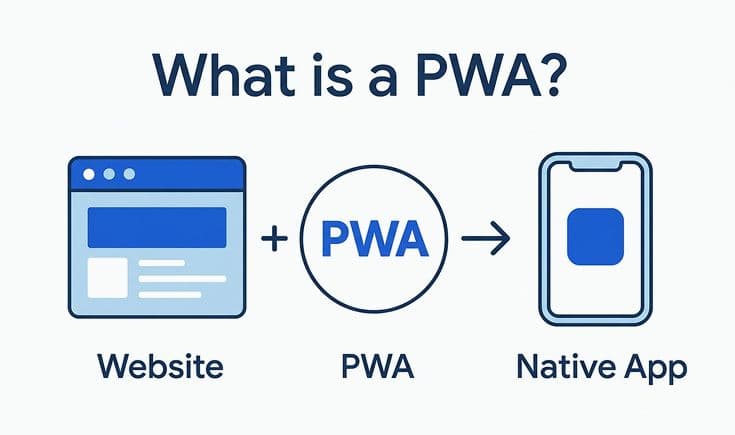
Native Apps are built specifically for iOS (Swift/SwiftUI) or Android (Kotlin/Java). They're distributed through app stores, have full access to device capabilities, and typically offer the highest performance. Requires separate codebases for each platform.
The fundamental difference: PWAs are web-first with app-like features. Native apps are platform-specific with full system integration.
Feature Comparison: What Each Can Actually Do
Installation and Distribution
PWA:
- Install directly from website (no app store)
- No review process or approval delays
- Updates deploy instantly to all users
- No 30% app store commission
- Searchable and shareable via URL
Native:
- Installed from App Store or Google Play
- Review process (1-7 days typically)
- Updates require user action
- 15-30% commission on purchases
- Better discoverability in app stores
Winner: Depends on priority. PWAs win for speed and cost. Native wins for app store visibility.
Offline Functionality
PWA:
- Service workers enable sophisticated caching
- Can work completely offline with pre-cached content
- Background sync when connection returns
- More limited than native offline capabilities
Native:
- Full offline database support
- Complex offline data synchronization
- Better handling of large offline datasets
- Deeper integration with device storage
Winner: Native, but PWAs have closed the gap significantly.
Push Notifications
PWA:
- Supported on Android fully
- iOS added support in iOS 16.4 (March 2023)
- Require user permission
- More limited than native notifications
Native:
- Rich notifications with images, actions
- Better delivery reliability
- Deeper customization options
- Silent background notifications
Winner: Native, though PWAs now work on both platforms.
Device Access and Capabilities
PWA (Supported):
- Camera and microphone
- Geolocation
- Accelerometer/gyroscope
- Bluetooth (experimental)
- File system access (limited)
- Web payments
- Clipboard
PWA (Not Supported):
- Background app refresh
- Deep system integration
- Advanced camera features
- NFC (limited)
- Complex biometric auth
- Full contacts access
Native (Full Access):
- All device sensors
- Background processing
- System-level integrations
- Advanced hardware features
- Full biometric integration
- Deep linking across apps
Winner: Native, but PWAs cover 80% of common use cases.
Performance
PWA:
- Fast for content and simple interactions
- JavaScript execution overhead
- No direct access to GPU for intensive tasks
- Adequate for most business apps
Native:
- Maximum performance for graphics and computation
- Direct hardware access
- Better for games and heavy processing
- Smoother animations (generally)
Winner: Native for demanding apps. PWAs for typical business/content apps.
Development Cost and Timeline
PWA Development
Time: 2-4 months for typical app
Cost: $30,000-80,000
Team: 2-3 developers (web stack)
Ongoing:
- Single codebase to maintain
- Web hosting costs ($50-500/month)
- No app store fees
- Faster iteration cycles
Native Development
Time: 4-8 months (iOS + Android)
Cost: $80,000-200,000+
Team: 4-6 developers (iOS + Android specialists)
Ongoing:
- Two codebases to maintain
- App store fees (15-30%)
- Slower release cycles
- More QA overhead
Reality check: Building native typically costs 2-3x more than PWA and takes 2x longer.
When to Choose PWA
PWAs make sense when:
1. You Need Fast Time to Market
If speed matters more than platform-specific features, PWAs let you launch in weeks instead of months. One codebase means faster development and simpler maintenance.
2. Budget Is Limited
Startups and small businesses often can't afford $150k+ for native development. PWAs deliver 80% of app functionality at 30-40% of the cost.
3. Content and Discovery Matter
PWAs are indexable by search engines and shareable via URLs. A user can discover your app through Google, try it instantly, and install if they want-no app store friction.
Example use cases:
- News and media sites
- E-commerce stores
- Business tools and dashboards
- Event or conference apps
- Restaurant/hotel booking
4. Cross-Platform Consistency Is Priority
One codebase guarantees identical functionality and design across platforms. No "iOS has this feature but Android doesn't" scenarios.
5. You Want Instant Updates
Deploy changes immediately. No waiting for app store review. All users get updates simultaneously when they reload.
When to Choose Native
Native apps are necessary when:
1. You Need Deep Hardware Integration
Apps requiring advanced camera features, AR/VR, complex sensor usage, or background processing need native. PWAs can't access these capabilities.
Example use cases:
- Fitness tracking with background monitoring
- Advanced photo/video editing
- AR/VR experiences
- Games with complex graphics
- Healthcare apps requiring precise sensor data
2. Performance Is Critical
Games, video editing, 3D modeling, or any computationally intensive task performs better natively. Direct hardware access makes a measurable difference.
3. App Store Presence Matters
If your users primarily discover apps through app stores rather than web search, native makes sense. Some demographics (older users, iOS users) strongly prefer app stores.
4. Offline-First Architecture Is Essential
Apps that need to function completely offline with complex data syncing (like field service apps or medical apps) benefit from native's deeper offline capabilities.
5. You're Targeting iOS-Heavy Demographics
iOS users expect native experiences. While PWAs work on iOS now, the experience isn't quite as polished as on Android. For iOS-first products, native remains superior.
The Hybrid Approach: Best of Both Worlds
Many companies don't choose - they build both. Start with PWA to validate quickly and capture web traffic, then add native apps later for specific features.
Successful hybrid examples:
Twitter (X): PWA for lightweight access, native apps for power users
Starbucks: PWA for mobile orders, native for loyalty integration
Uber: Native for core ride-hailing, PWA for web bookings
This lets you serve both web-first users and app-store-first users without choosing one over the other.
Real-World Performance Data
Recent studies comparing PWA and native performance:
Starbucks PWA saw 2x daily active users after launching PWA, with 99.84% smaller install size than native app.
Twitter Lite (PWA) reduced data usage by 70%, increased pages per session by 65%, and bounce rate dropped by 20% versus mobile web.
Pinterest PWA achieved a 40% increase in time spent and 44% increase in user-generated ad revenue compared to mobile web.
These numbers suggest PWAs can match or exceed native engagement for many use cases - especially when installation friction matters.
Testing Across Devices: Why It Matters for Both
Whether you choose PWA or native, testing across actual device profiles is critical. PWAs behave differently on iOS Safari versus Android Chrome. Native apps have platform-specific quirks.
During development, you need to see how your app performs on various screen sizes, OS versions, and device capabilities. Phone Simulator lets you preview PWAs and mobile web interfaces across 30+ device profiles instantly - from iPhone 17's tall screen to Galaxy foldables to budget Android phones. This helps you catch rendering issues, touch target problems, and viewport quirks before users encounter them.
For context on device-specific rendering differences that affect both PWA and native web views, check out our guide on iOS vs Android rendering differences.
Platform-Specific Considerations
iOS
- PWA notifications only work when app is added to home screen
- Limited background processing
- Safari has stricter PWA limitations than Chrome
- iOS users expect App Store apps
Android
- Full PWA support including notifications
- Better background sync capabilities
- Chrome dominates market share
- Users comfortable with browser-based apps
The gap is closing, but Android remains more PWA-friendly in 2026.
The Hidden Costs No One Talks About
PWA Hidden Costs
- Converting users to "install" the PWA is harder than app store downloads
- Less polished feel may increase churn
- Missing features can frustrate power users
- Browser compatibility issues across versions
Native Hidden Costs
- App store optimization (ASO) ongoing effort
- Review delays can miss launch windows
- Platform-specific bugs require separate fixes
- User resistance to updates (many run old versions)
Making the Decision: A Framework
Ask yourself these questions:
1. Do you need features PWAs can't provide?
If yes → Native
2. Is budget under $50k?
If yes → PWA
3. Is time to market under 3 months?
If yes → PWA
4. Are you targeting gamers or iOS-heavy audience?
If iOS-heavy audience → Native
5. Is SEO and web discovery important?
If yes → PWA
6. Can you afford to build and maintain two apps?
If yes → Native (or both)
If you answered "no" to questions 1, 4, and 6 - PWA is likely your answer.
Future Outlook: Where Things Are Heading
PWAs continue gaining capabilities. WebGPU brings better graphics performance. WebAssembly enables near-native computation. Apple is slowly improving iOS PWA support.
But native apps aren't going anywhere. The app stores provide discovery, trust, and revenue models that PWAs can't fully replace. Premium apps, games, and platform-specific experiences will remain native.
The trend: More businesses will use PWAs as primary mobile presence, with native apps reserved for specific features or audiences. The "PWA first, native if needed" approach is becoming standard.
The Bottom Line
Progressive Web Apps offer 80% of native functionality at 30-40% of the cost and timeline. For content sites, e-commerce, business tools, and most apps, PWAs are the smart choice in 2026.
Native apps still win for games, intensive computing, deep hardware integration, and iOS-first products. They provide the best performance and most polished experience at the cost of complexity and expense.
Don't overthink it: Start with what you can afford and ship quickly. You can always add native apps later if your PWA proves successful and specific features demand it.
Ready to test how your PWA or mobile web app performs across different devices? Phone Simulator for Chrome gives you instant preview across iPhone, Android, and tablet screens - helping you build experiences that work perfectly everywhere.
Build what works for your users, not what's trendy. Test it everywhere.
Frequently Asked Questions
What is the difference between a PWA and a native app in 2026?
A PWA is a web application enhanced with app-like features, while a native app is built specifically for iOS or Android. PWAs use one codebase for all platforms, native apps require separate development.
Are PWAs a good alternative to native apps in 2026?
Yes, for many use cases PWAs cover around 80% of native app functionality. They are faster to build, cheaper to maintain, and work across platforms.
When should I choose a PWA instead of a native app?
Choose a PWA when time to market, budget, SEO, and cross-platform consistency are priorities. PWAs are ideal for content, e-commerce, and business tools.
When is native app development still the better choice?
Native apps are better for performance-critical applications, games, advanced hardware access, and iOS-first audiences that expect App Store distribution.
How can I test a PWA across different mobile devices efficiently?
A mobile emulator allows instant preview across multiple screen sizes and platforms. This helps identify device-specific rendering and interaction issues early.
Why is testing important for both PWAs and native apps?
PWAs and native apps behave differently across devices, browsers, and operating systems. Testing ensures consistent layouts, performance, and usability.
Can companies use both PWA and native apps together?
Yes, many companies use a hybrid approach: a PWA for web and lightweight use, and native apps for advanced features or power users.
Install Phone Simulator Today
Join thousands of developers and designers who test their sites on real devices for free.
- Free
- 30,000+ users
Read More About Mobile Testing & UX

How to Run an Android Emulator in Chrome
A lightweight Android emulator in Chrome previews your site on real Android device sizes — no Android Studio needed. Here's how to run one and what to check.
Read more
How to View Mobile Version of Website on Chrome
See how to view the mobile version of any website directly in Chrome — using built-in DevTools and a free device-simulator extension that shows a realistic phone frame.
Read more

Why Your Website Should Load in Under 2 Seconds on Mobile - Backed by 2025–2026 Data
This guide explains why 2 seconds became the standard, what current data tells us about mobile performance, and how to hit that target consistently across devices and networks.
Read more