

What “Mobile-First” Really Means in 2026: Why Modern Websites Must Prioritize Smartphones
In 2026, mobile-first is no longer a trendy phrase - it’s the foundation of how successful digital products are designed, built, and optimized.
📋 Table of Contents
A mobile-first approach means planning every aspect of a website or web application with the smartphone user as the primary audience, and only then adapting the experience for larger devices like laptops or desktops.
As mobile usage continues to dominate global internet activity, companies that still build “desktop-first” websites are missing out on visibility, conversions, and SEO performance.
Why Mobile-First Matters in 2026
Mobile has become the dominant way people access the internet
According to DataReportal’s 2026 Global Digital Report, mobile devices account for 59-63% of all web traffic worldwide, depending on the region. In countries with high smartphone penetration, such as the United States, the UK, and Singapore, this number climbs even higher - up to 70%.
Additional industry insights:
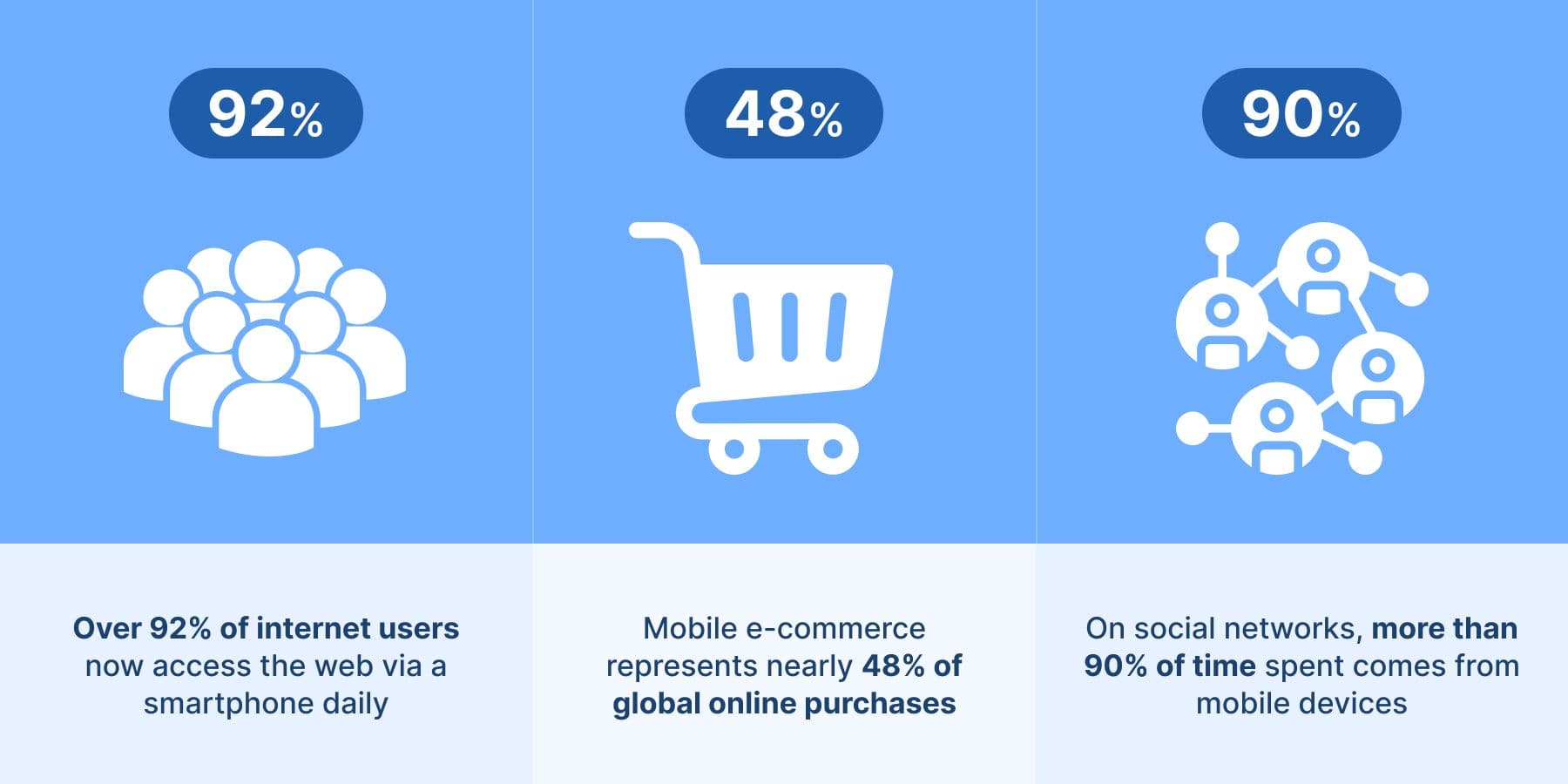
- Over 92% of internet users now access the web via a smartphone daily.
- Mobile e-commerce represents nearly 48% of global online purchases, with projections showing it will surpass desktop purchases before 2028.
- On social networks, more than 90% of time spent comes from mobile devices.
This shift in usage patterns explains why Google’s algorithms, especially after the 2025 Mobile Experience Update, continue to reward mobile-optimized pages with higher rankings.
What a Mobile-First Approach Really Means
Designing mobile-first isn’t just about shrinking a layout. It’s a complete mindset shift that affects planning, UX design, development, and optimization.
1. Prioritizing essential content
Mobile screens are narrow and vertically oriented. A mobile-first strategy forces product teams to decide:
- What information matters most?
- What must be visible without scrolling?
- What can be removed or hidden behind interactions?
This leads to clearer layouts, faster load times, and better user experience across all devices.
2. Designing the mobile interface before desktop
Most 2026 digital design workflows start with:
- A mobile wireframe
- A compact UI layout
- Touch-friendly elements
- A navigation structure simplified for small screens
Only after the mobile experience is fully functional do teams expand the interface for tablets and desktops.
3. Optimizing for diverse mobile screen sizes
Modern users access websites from:
- Foldable phones
- Ultra-wide smartphones
- Compact budget devices
- High-resolution flagship screens
This requires flexible layouts, responsive typography, and adaptive images.

Mobile-First Development Best Practices
A true mobile-first codebase includes:
Performance optimization
- Minimize JavaScript bundle sizes
- Defer non-critical scripts
- Compress and resize images
- Use efficient CSS layout techniques like Flexbox and CSS Grid
- Reduce server response times
Accessibility and usability
- Large tap targets
- High-contrast text
- Optimized font sizes
- Smooth scrolling and hardware-accelerated animations
Cross-device testing
Testing on a single iPhone or Android device is not enough. Teams must cover:
- Dozens of screen resolutions
- Multiple aspect ratios
- Different device DPR (pixel density) levels
- Varying network speeds
This is where mobile simulation tools become essential.
How to Test Mobile-First Designs Effectively
Testing directly on physical devices is ideal - but not always practical, especially when you need to view a website on 15–30 different screen sizes.
A fast alternative is using a mobile simulation tool inside your browser.
For example, with the Phone Simulator – Mobile Emulator Tool, you can:
- Instantly preview any webpage in a mobile layout
- Switch between popular devices (iPhone, Samsung Galaxy, Pixel, iPad, etc.)
- Change screen resolutions
- Test how your layout adapts to different breakpoints
- Validate responsive design on the fly
This workflow makes it easier to keep mobile-first principles in mind during design, development, debugging, and SEO optimization.
Step-by-Step: How to Preview Any Website in Mobile Mode Using a Browser Extension
- Install Phone Simulator – Mobile Emulator Tool from the Chrome Web Store.
- Open any website you want to test.
- Click the extension icon.
- Choose a device model or screen size from the list.
- Instantly view the mobile version of the page and make adjustments as needed.
This method saves significant time compared to switching between physical devices or constantly resizing your desktop browser window.
How Mobile-First Improves SEO in 2026
Google evaluates the mobile version of your website first. A strong mobile experience directly improves:
- Page ranking
- Core Web Vitals performance
- User engagement metrics (bounce rate, time on page, click-through rate)
- Conversion rate
Mobile-first SEO includes:
- Fast loading times (LCP under 2.5s)
- Responsive images
- Lightweight scripts
- A logical, vertical content structure
- Avoiding intrusive pop-ups
- Simplified navigation
- Consistent mobile UX across devices
Websites that fail to optimize for mobile in 2026 are at a significant disadvantage in search results.
To sum it up
A mobile-first mindset is no longer optional - it’s the standard for building successful digital experiences in 2026. With smartphones leading global web usage, businesses must design, develop, and optimize their websites primarily for mobile users to stay competitive in SEO and user satisfaction.
Chrome extensions like Phone Simulator – Mobile Emulator Tool help streamline testing and ensure your website looks and behaves perfectly on any device. Embracing mobile-first design today sets the foundation for stronger rankings, better user engagement, and higher conversions tomorrow.
Frequently Asked Questions
What does mobile-first design mean?
Mobile-first design means creating a website for smartphones first, then progressively adapting it for tablets and desktop screens.
Why is mobile-first important in 2026?
Because the majority of web traffic and Google’s indexing now come from mobile devices, mobile-first sites rank better and convert more users.
Is mobile-first design required for SEO?
Yes. Google uses mobile-first indexing, so your mobile version determines rankings, Core Web Vitals, and visibility in search results.
What is the difference between mobile-first and responsive design?
Responsive design adapts layouts to screen size, while mobile-first starts with mobile UX as the foundation and scales up to larger screens.
How does mobile-first improve website performance?
Mobile-first encourages lighter pages, smaller images, fewer scripts, and faster load times, improving LCP, INP, and overall UX.
How can I test mobile-first layouts without real devices?
You can use a mobile emulator browser extension to preview real device viewports directly in Chrome.
How does mobile-first design affect conversions?
A faster, clearer mobile experience reduces bounce rates and significantly improves engagement and conversion rates.
What screen sizes should be tested in mobile-first design?
At minimum: 320px, 360px, 375px, and 390–430px to cover budget devices, Android phones, and modern iPhones.
Install Phone Simulator Today
Join thousands of developers and designers who test their sites on real devices for free.
- Free
- 30,000+ users
Read More About Mobile Testing & UX

How to Run an Android Emulator in Chrome
A lightweight Android emulator in Chrome previews your site on real Android device sizes — no Android Studio needed. Here's how to run one and what to check.
Read more
How to View Mobile Version of Website on Chrome
See how to view the mobile version of any website directly in Chrome — using built-in DevTools and a free device-simulator extension that shows a realistic phone frame.
Read more

Why Your Website Should Load in Under 2 Seconds on Mobile - Backed by 2025–2026 Data
This guide explains why 2 seconds became the standard, what current data tells us about mobile performance, and how to hit that target consistently across devices and networks.
Read more